Stage any room in 13 styles, under a minute
Upload a photo of an empty room, pick a style, and download a fully furnished listing image. Keep every angle consistent, edit a whole listing at once, and even stage with your own furniture. AI virtual staging for real estate agents, brokers, and listing photographers.
 Or try it now with our photoNo upload, no signup. Explore every effect.
Free to explore · Create an account to generate · 30 free credits
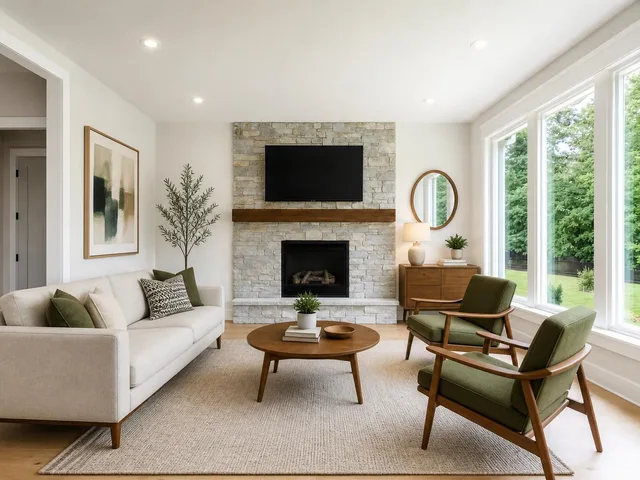
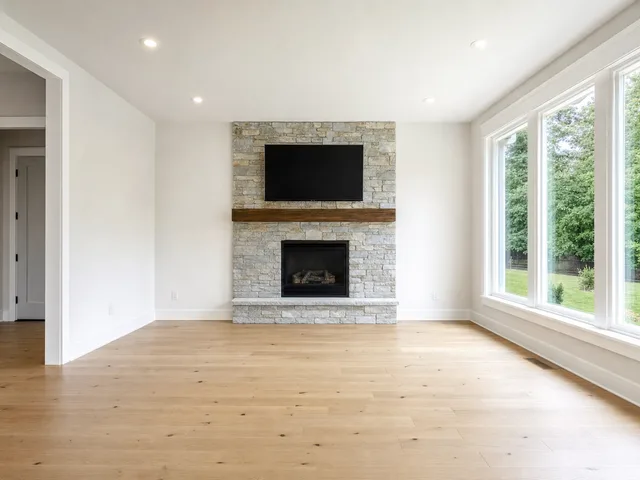
Drag the slider. Empty room, staged in midcentury modern.
What is virtual staging?
Virtual staging is the process of digitally adding furniture and decor to photos of empty or outdated rooms. Instead of renting and physically placing furniture, you upload a photo of the room and the software furnishes it in a chosen interior style, producing a realistic listing image in minutes. It gives agents the staged look buyers respond to online, at a fraction of the cost and turnaround of physical staging. For a full walkthrough, see our guide to virtual staging for real estate.
How it works
Upload a photo
Upload a photo of the empty or outdated room you want to furnish. No special equipment needed.
Pick a style
Choose from 13 interior design styles and the AI furnishes the room to match its perspective and lighting.
Download
Download the staged image in under a minute, ready to add to your listing and marketing.
Why agents pick Reel Estate
Every angle stays consistent
Stage one photo of a room and Reel Estate carries the same furnished look to every other angle of that room. A whole gallery matches instead of one shot looking staged and the rest empty.
Edit a whole listing at once
Apply one fix or effect to a batch of photos in a single pass, each edited on its own. Replace skies, declutter, or restage a full set without repeating yourself photo by photo.
13 interior styles
Stage any room in midcentury, farmhouse, modern, minimalist, Japandi, Scandinavian, and more. Pick the look that matches your buyer.
Stage with your own furniture
Upload furniture you actually use and stage rooms with those specific pieces, not just stock sets. Available on paid plans.
More than furniture
Virtual twilight, seasonal and holiday looks, decluttering, object and vehicle removal, sky replacement, lawn and pool cleanup, and exterior staging for patios and yards. All in one editor.
Stage once, reuse forever
Stage a photo once and reuse the asset across every channel and campaign, with no per-listing or per-image fees.
One editor for the whole listing
Staging is the start. The same editor cleans up, relights, and restyles every photo in a listing, and works a full set at once with multi-perspective staging and group edits. For a step-by-step approach, see how to stage an entire listing consistently.
Furnish
- One-Click Staging in 13 styles
- Stage with your own furniture
- Add a specific piece of furniture
- Exterior staging for patios and yards
Clean up
- Declutter a room
- Remove objects
- Remove vehicles
- Clear a room to empty
- Turn off TV screens
Relight and refresh
- Virtual twilight
- Seasonal and holiday looks
- Sky replacement
- Lawn treatment
- Pool water cleanup
Work the whole set
- Multi-perspective: every angle consistent
- Group edit: one effect across a batch
- Stage once, reuse everywhere
What does virtual staging cost?
Traditional done-for-you virtual staging is priced per image. As of 2026, human services charge roughly $24 to $35 per photo: VirtualStaging.com around $24, BoxBrownie around $30, and Stuccco around $35. Across a full listing that adds up, and you pay again every time you restage.
| Approach | Typical cost |
|---|---|
| Done-for-you (human) services | ~$24 to $35 per image |
| Reel Estate AI staging | 1 credit (~$0.30 to $0.45) per photo, free to reuse |
AI virtual staging replaces the per-image fee with a flat subscription. With Reel Estate, staging a photo costs a single credit, and once it is staged the image is yours to reuse across every channel at no extra cost.
Does virtual staging actually help sell?
Staging works, and the data backs it. NAR's 2025 Profile of Home Staging found that 49% of sellers' agents saw staging reduce a home's time on the market, and 83% of buyers' agents said staging makes it easier for buyers to picture a property as their future home (NAR, 2025). Virtual staging extends that advantage to every listing, not just the ones with a physical staging budget.
One caveat: virtual staging has to be disclosed. Label staged images and keep the original available, since California's AB 723 and a growing list of MLS rules now require it. See AI disclosure compliance for the details.
Frequently asked questions
What is virtual staging?
How much does virtual staging cost?
Is virtual staging legal?
What is the difference between virtual and traditional staging?
How do you virtually stage a photo?
Can I keep every photo of a room consistent?
Can I stage with my own furniture?
Can I stage more than interiors?
Is there free virtual staging?
Stage your first listing free
30 free credits when you sign up. No credit card required.
Start staging free